Because dragging screenshots into your agent is so 2025.
Point at it. Say it. Your agent sees it.
Press a hotkey, point and talk, then press it again.
Ramble pairs your spoken remarks with screenshots and pointer markers, so your coding agent can see what you mean.
For Macs with Apple silicon, macOS 15.2 or later.
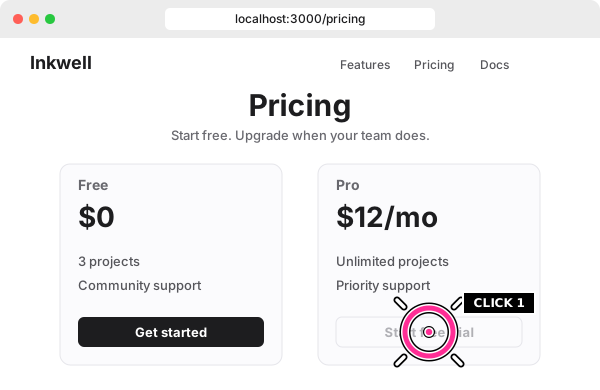
The pill and demo captions are not in the recording; the rings are drawn onto the screenshots your agent gets.
What your agent gets
More than a screenshot.
Every remark gets a screenshot
With a ring where you were pointing inside the recording.
Names what you pointed at
When available, Ramble includes the name of the UI element you pointed at.
Transcribed on your Mac
Nothing is uploaded.
Ready for your coding agent
By default, Ramble copies a prompt when your review is ready. Paste it into your agent to have it read the review.
Works with the agent you use
Any coding agent that can read files can use your review.
How it works
Press, talk, press.
01
Press ⌃⌥R.
Pick a window, an app, a display or a region. Ramble remembers it for next time.
02
Click around and talk.
Keep the pointer on the thing you mean. A small pill shows the time and your mic level, and it's left out of the recording.
03
Press ⌃⌥R again.
When the review is ready, Ramble copies a prompt by default. Paste it into your agent.
Features
Show it anything.
Show your agent anything on your screen. Point out a problem, explain an idea, or walk through what you want to change.
- Context comes along. Each review records the app, window title and browser URL when Ramble can find them.
- Follows your windows. If the app opens Settings or a panel during the recording, Ramble records that window too.
- Talk as long as you need. There's no length limit on transcription.
- Stays out of your way. The pill never takes focus. You discard a recording with two presses of Esc, so one stray keypress won't lose your review.
Private by design
Everything stays on your Mac.
- Your speech is transcribed on your Mac.
- The app needs no account.
- Recordings stay in your reviews folder. By default, reviews move to the Trash after 30 days. In Settings, choose how long to keep them or keep them indefinitely.
- Never reads password fields.
FAQ
Questions
How is Ramble different from speech-to-text or screenshot apps?
Speech-to-text captures your words. A screenshot captures the screen. Ramble pairs each spoken remark with a screenshot in a review your coding agent can read.
Markers show where you pointed inside the recording. When available, Ramble also includes the name of the UI element you pointed at. So “make this button bigger” comes with the button you mean.
Is Ramble free?
No, Ramble will be a paid app. Sign up and we'll email you the price when it launches.
Which Macs does it run on?
Macs with Apple silicon, on macOS 15.2 or later.
What apps does Ramble work with?
Any app on your Mac, including browsers and Electron apps. Ramble pairs what you say with screenshots of what you're showing.
Optional permission lets Ramble include UI element names when the app provides them. Without it, you still get your spoken remarks and screenshots.
Which agents does it work with?
Any agent that can read files, including Claude Code, Codex, Cursor and Pi.
Point at it. Say it. Your agent sees it.
For Macs with Apple silicon, macOS 15.2 or later.